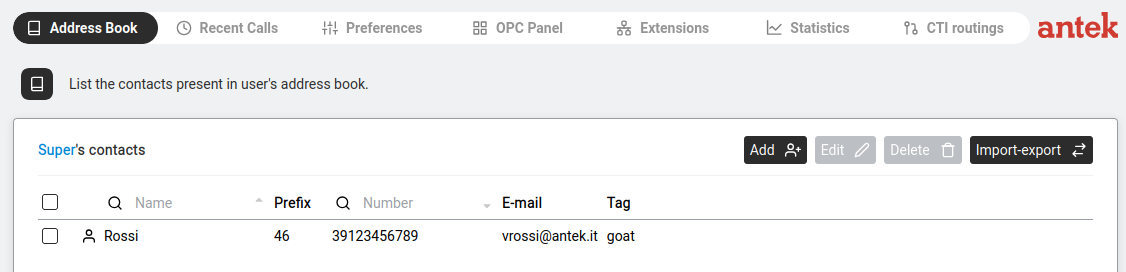
This is your personal address book. Depending on your privileges, you may also see other users' address books here.
Navigate to Phone > Address Book. The page heading reads
[Username]'s contacts, where [Username] is replaced with the
name of the user whose address book you're viewing (your own, by default).
| Button | Action |
|---|---|
Add  + + | Create a new contact. |
Edit  | Select a contact first, then click to modify it. |
Delete  | Tick checkboxes next to contacts, then click to remove them. |
Import-export  | Opens the import/export dialog (see below). |
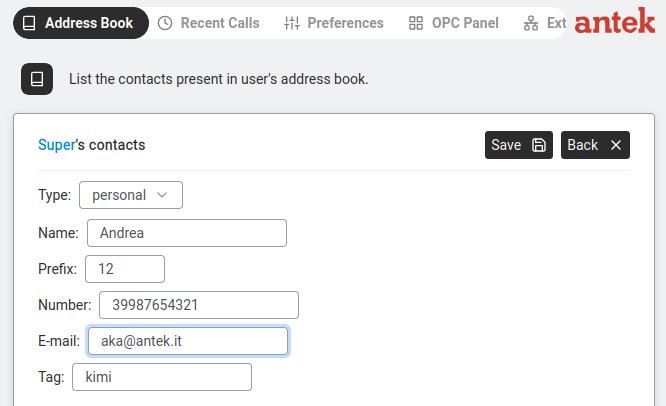
Click Add. The form shows:
| Field | Rules | Required? |
|---|---|---|
| Type | Dropdown: personal (only you can see this contact) or public (visible to every user with Phone access on this Abilis). | Yes |
| Name | 1 to 32 characters. The "*" character is not allowed. | Yes — "Name is required" appears in red if left blank. |
| Prefix | Up to 8 digits, optional. Prepended to Number when dialling — the Abilis dials the concatenation of Prefix + Number. Use it to store a country code, carrier prefix or outside-line escape that you want kept separate from the local number for editing convenience. | No |
| Number | Digits only, maximum 20 characters. "Number field must consist of digits only and can have maximum 20 characters" appears in red if invalid. The field does not accept + or other formatting characters; international numbers are stored as digits only (e.g. 390212345678 for +39 02 12345678). Combined Prefix + Number cannot exceed 20 digits. | Optional, but a contact with no number can't be dialled. |
| Up to 60 characters. | No | |
| Tag | Up to 20 characters. Use for grouping (e.g. "Client", "Supplier", "VIP"). | No |
Click Save to add the contact or Back to cancel.
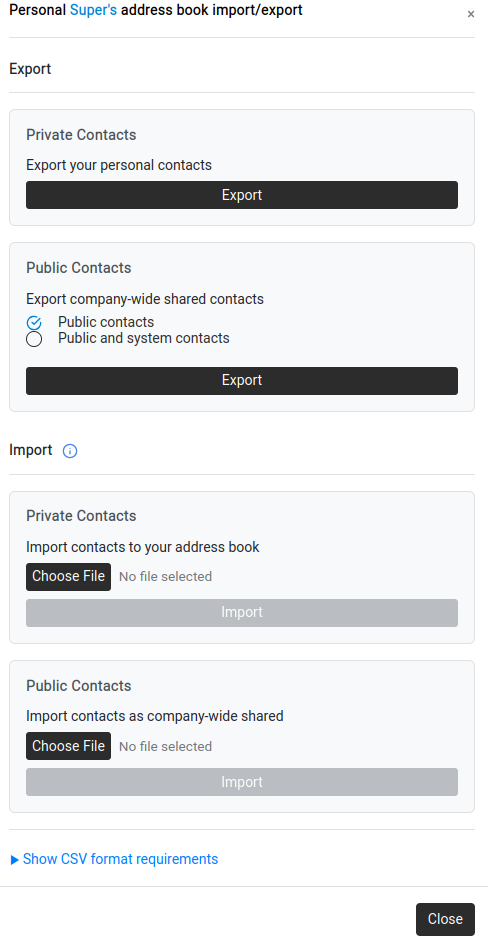
Click Import-export to open a dialog with two columns:
| Export (Left) | Import (Right) | |
|---|---|---|
| Private Contacts | "Export your personal contacts" — click Export. | "Import contacts to your address book" — click Choose File, select a CSV, click Import. |
| Public Contacts | "Export company-wide shared contacts" — choose between "Public contacts" or "Public and system contacts", then Export. | "Import contacts as company-wide shared" — click Choose File, select a CSV, click Import. |
Click "Show CSV format requirements" at the bottom of the dialog. The file must be CSV with column headers aligned exactly as shown:
| Column A | Column B | Column C | Column D | Column E |
|---|---|---|---|---|
| NAME | PREFIX | NUMBER | TAG | |
| Antonio Rossi | 31495736 | antonio@email.test | Tagtest | |
| Luca Romano | 1232 | 6744527 | lromano@test.it | luca-romano |
Field limits: NAME (1–32 chars, required, no "*"), PREFIX (up to 8 digits, optional), NUMBER (1–20 digits, optional but recommended — combined PREFIX + NUMBER cannot exceed 20 digits), EMAIL (up to 60 chars, optional), TAG (up to 20 chars, optional).
Click Close when done.