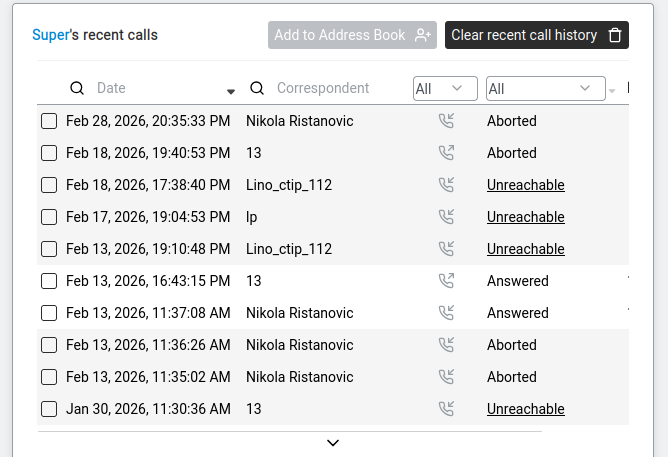
Every phone call you've made or received, newest first. Filter by direction, by outcome or look up missed calls. Each row gives you actions to call back, retry or add the number to your Address Book.
Navigate to Phone > Recent Calls. The page shows [Username]'s recent calls — a list of every call you have made or received, with the newest calls at the top.
Each call in the list shows:
| Column | What It Shows | Example |
|---|---|---|
| Date | When the call happened. | 08/03/2026 14:32 |
| Correspondent | Who was on the other end — their name (if in Address Book) or number. | Maria Rossi / +39 02 1234567 |
| Call result | What happened with the call. | Answered, Busy, Aborted, Unreachable |
| Duration | How long the call lasted. Format is always H:MM:SS — 0:03:45 means 3 min 45 sec, not "around midday". | 0:03:45 |
Click a number in the log to act on it directly:
| Action | What it does |
|---|---|
| Call | Dial the number again from your extension. |
| Abort a call | If the listed call is currently active, end it. |
| Make a call try | Place a fresh attempt with the same number (useful for short retry sequences). |
| Abort call try | Cancel an in-progress call attempt before it connects. |
| Add number to the Address Book | Save the number as a new contact — opens the Add Contact form pre-filled with the number. |
Page-level actions (top of the page):
You can narrow the list using filters at the top:
This is useful when you want to find, say, all the calls you missed yesterday — filter by Incoming + Unreachable/Aborted.
| What You See | What It Means |
|---|---|
| "ERROR: [-9] - file not found" | No call history file exists yet. This happens on a fresh system or if the TRFA (Traffic Analyser) has not been configured. See Activate traffic analysis (TRFA). |
| Empty list | No calls have been made or received since the last log reset. |