Configure how your extension behaves: which calls ring through, where they forward to when you can't take them, voicemail and call recording. Settings apply per phone technology — if you have multiple phones registered, each tab below controls one.
Navigate to Phone > Preferences. The page shows [Username]'s preferences with a Save button at the top right.
If your account has multiple phone technologies enabled, you will see tabs across the top. Most users only see one. The available technologies are:
| Tab | When You Use It | Typical Device |
|---|---|---|
| CTIP | Physical phone hardwired to the Abilis unit via a direct cable. | Analogue phone plugged into a CTIP port. |
| CLUS | Multi-site cluster — calls between branch offices connected via VPN. | Inter-office calls. |
| SIP | Any IP-based phone. | Desk IP phone (Yealink, Grandstream, etc.), PC softphone, Abilisphone app. |
| IAX | IAX protocol — uncommon, used in some Asterisk integrations. | IAX-compatible phones. |
| Abilisphone | The Abilisphone mobile app on your smartphone. | Android/iOS Abilisphone app. |
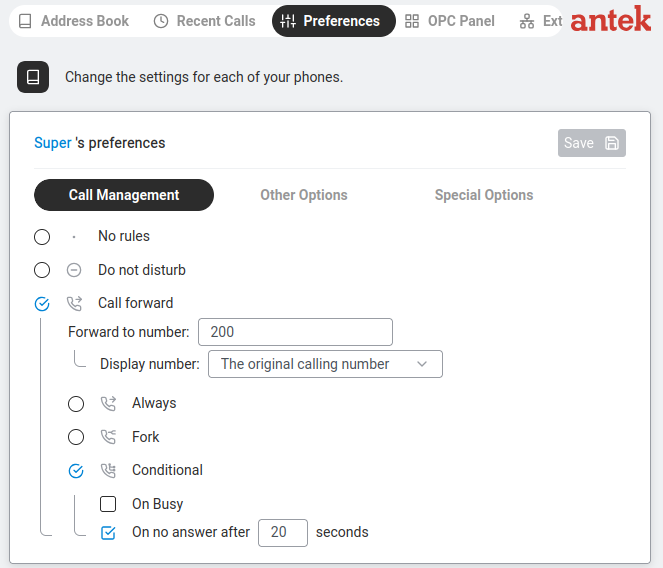
This controls what happens when someone calls your extension. Three options — pick one:
| Option | Icon | What Happens | When to Use |
|---|---|---|---|
| No rules | Disables all Call Management rules. Your phone rings normally; no Do-Not-Disturb, no Call Forward. | Normal everyday work. | |
| Do not disturb |  | All incoming calls are immediately rejected. Callers hear a busy tone. | Important meeting where you must not be interrupted. |
| Call forward |  | Calls are redirected to another number. When selected, additional fields appear:
— Forward to number — enter the destination (colleague's extension, mobile number, etc.) — Caller ID display — show the Original caller's number or the Forwarder's number — When to forward: • Always — phone doesn't ring; calls are forwarded immediately. • On busy — only when your line is already in a call. • On no answer — after a configurable number of seconds. • On all other causes — anything not covered by the three above (typically: phone unregistered, network unreachable, error states). | Going on holiday, working from home or covering for a colleague. |
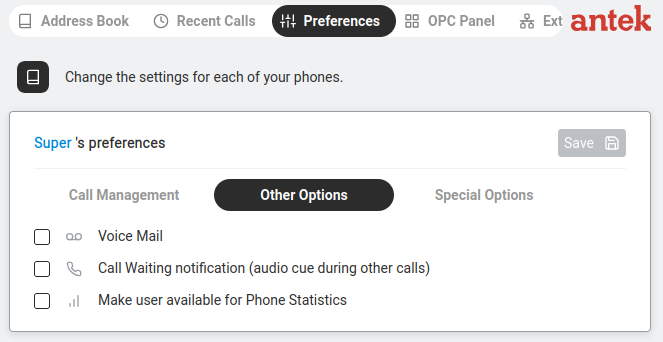
Four checkboxes, each with a small icon:
| Checkbox | Icon | What It Does When Enabled |
|---|---|---|
| Voice Mail |  | Callers can leave a voice message when you don't answer. The recording is sent to your email. When you tick this, additional options appear: when to activate (Always, On Busy, On No Answer after N seconds, On All Other Causes), email address for recordings and options to manage custom welcome/goodbye messages. |
| Voice Recorder |  | Records your phone calls and sends the recordings to your email. Useful for keeping records of important conversations. |
| Call Waiting notification |  | "Audio cue during other calls" — if you are already on a call and someone else calls, you will hear a beep tone. Without this, the second caller simply gets a busy signal. |
| Make user available for Phone Statistics |  | Includes your calls in the traffic reports visible on the Statistics tab. If unticked, your calls won't appear in any statistics reports. |
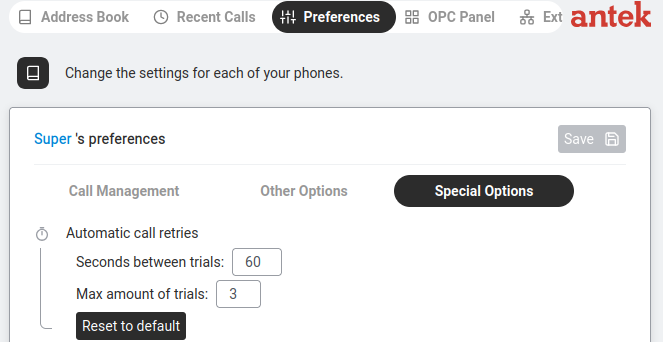
This sub-tab configures Automatic call retries — when an outgoing call from your extension fails to connect (busy, no answer, network error), the Abilis can keep retrying for you:
| Field | What it controls |
|---|---|
| Seconds between trials | Wait this many seconds before each retry attempt. |
| Max amount of trials | Give up after this many attempts. |
Set both to 0 to disable automatic retries entirely.
Always click Save (top right) after making any changes on any sub-tab.