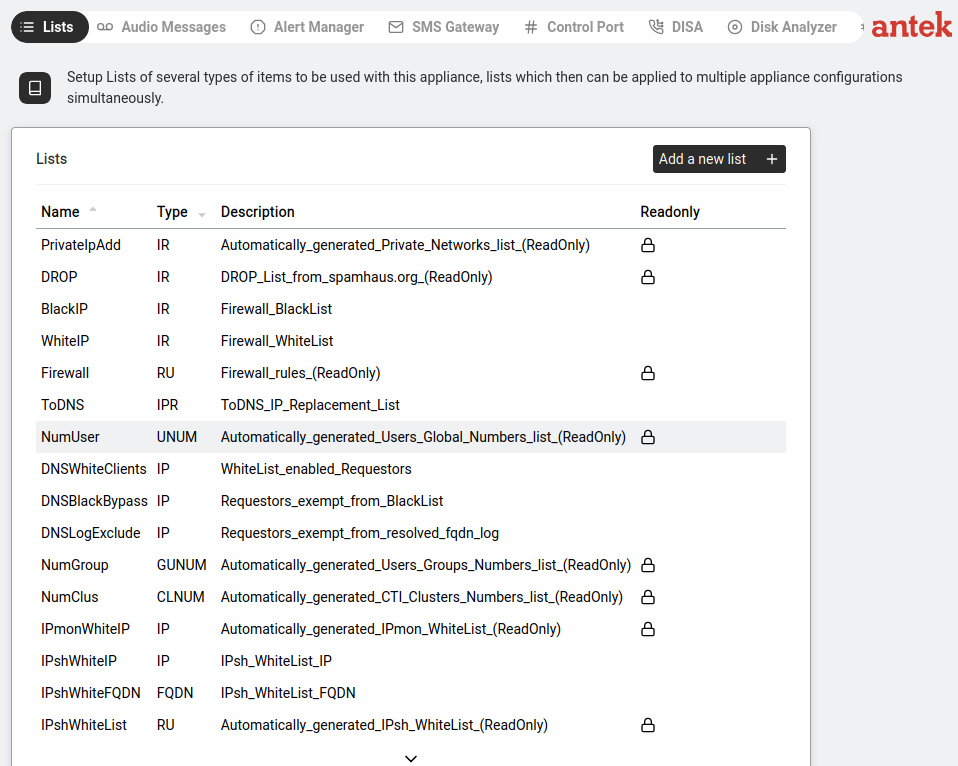
"Setup Lists of several types of items to be used with this appliance, lists which then can be applied to multiple appliance configurations simultaneously."
Navigate to Tools > Lists. This page shows all lists currently configured inside the Abilis system. Lists are collections of values (phone numbers, IP addresses, domain names) used by other parts of the system — routing rules, firewall ACLs, DNS filtering, IP Shaping whitelists, etc.
Click on a list row to view its contents and edit the entries.
Read-Only lists are auto-generated by the system and cannot be edited. They have a
 icon and "(ReadOnly)" in the Description. These include the master number lists, firewall rules
and generated whitelists.
icon and "(ReadOnly)" in the Description. These include the master number lists, firewall rules
and generated whitelists.
Editable lists can be modified by clicking on them and adding/removing entries. These are user-defined lists like BlackIP, WhiteIP, ToDNS, etc.
| Name | Type | Description | |
|---|---|---|---|
| PrivateIpAdd | IR | Auto-generated private networks list | |
| DROP | IR | DROP list from spamhaus.org — known malicious IPs | |
| BlackIP | IR | Firewall BlackList — IPs you want to block | |
| WhiteIP | IR | Firewall WhiteList — IPs you want to always allow | |
| Firewall | RU | Firewall rules (auto-generated) | |
| ToDNS | IPR | ToDNS IP replacement list | |
| NumUser | UNUM | Auto-generated users' global numbers | |
| DNSWhiteClients | IP | Whitelist-enabled DNS requestors | |
| DNSBlackBypass | IP | Requestors exempt from DNS blacklist | |
| DNSLogExclude | IP | Requestors exempt from resolved FQDN log | |
| NumGroup | GUNUM | Auto-generated users' groups numbers | |
| NumClus | CLNUM | Auto-generated CTI clusters numbers | |
| IPmonWhiteIP | IP | Auto-generated IP monitor whitelist | |
| IPshWhiteIP | IP | IP Shaping whitelist (IP addresses) | |
| IPshWhiteFQDN | FQDN | IP Shaping whitelist (domain names) | |
| IPshWhiteList | RU | Auto-generated IP Shaping whitelist (combined) | |
| NumVoNet | INN | Auto-generated CTI Virtual Office Net numbers | |
| NumVoUser | INN | Auto-generated CTI Virtual Office User numbers | |
Lists are referenced throughout the system by name. For example:
PrivateIpAdd as the list of hosts allowed to access the web interface.DNSWhiteClients and DNSLogExclude.IPshWhiteIP and IPshWhiteFQDN for bandwidth exemptions.NumUser or custom lists.To create a new list, click Add a new list +, choose a name, type and description.