"Manage hard disk drives connected to the appliance."
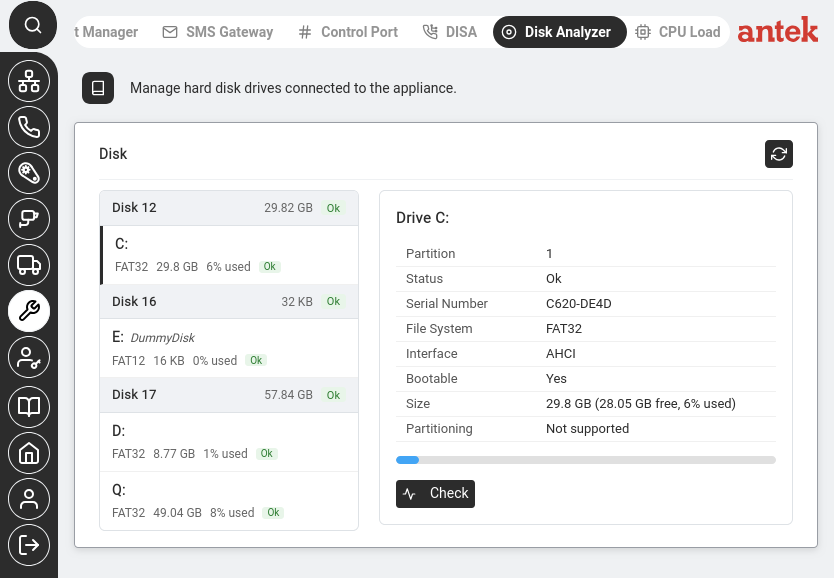
Navigate to Tools > Disk Analyzer. This page shows all storage drives attached to the Abilis unit — the internal drive(s) plus any USB 2.0+ pen drive you've plugged in. Storage is used for video recordings, audio messages, call logs, configuration files and firmware versions.
The left rail lists every detected disk — each shows its size and a
state badge (Ok when no errors are detected). Beneath each disk are its
partitions, with the drive letter (C:, D:, …), file system, size and percentage used.
Click the refresh button ( ) to rescan.
Click a drive in the left rail to open its detail on the right, with a usage bar underneath:
| Field | Example | What It Tells You |
|---|---|---|
| Partition | 1 | Partition number on the disk. |
| Status | Ok | Health status — "Ok" means no errors detected. |
| Serial Number | C620-DE4D | Unique identifier of the partition. |
| File System | FAT32 | How data is organised on the partition. |
| Interface | AHCI | How the disk is connected internally. |
| Bootable | Yes | Whether the system can boot from this partition. |
| Size | 29.8 GB (28.05 GB free, 6% used) | The key field — total size, free space and usage percentage (also drawn as the bar below). |
| Partitioning | Not supported (or MBR / GPT) | The partition scheme of the disk. |
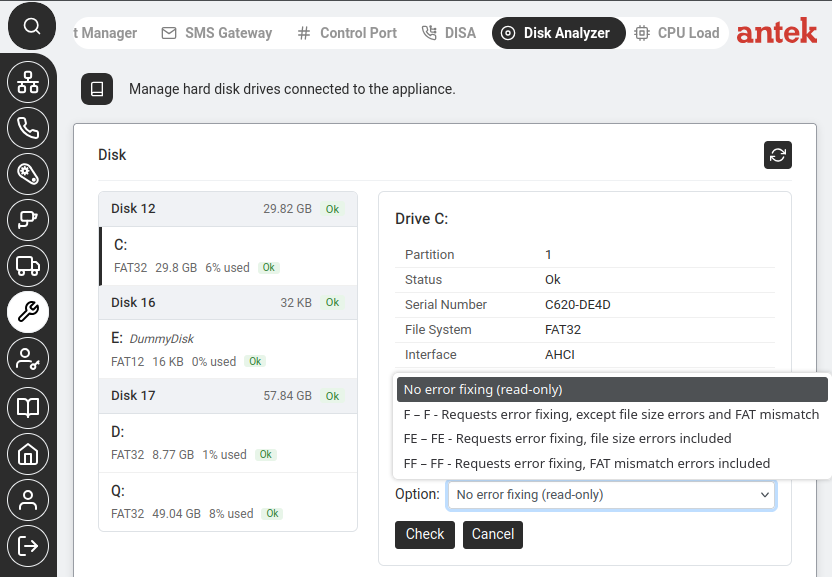
Click Check under the drive detail to run a file system check on that drive. An Option dropdown offers the same error-fixing modes the Videorecorder uses — No error fixing (read-only), F, FE and FF; see the Check disk option table for what each one fixes. Then click Check to start.