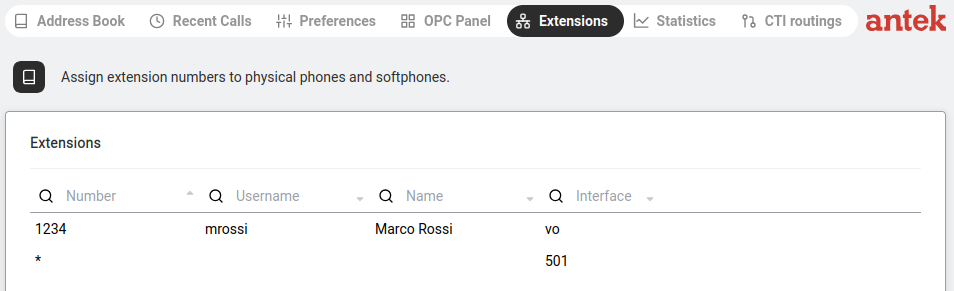
A read-only list of every extension currently registered on the Abilis. Use it to check who has which number, see whether a phone is online and look up which connection technology it uses.
Navigate to Phone > Extensions. This page shows a table of all phone extensions registered on the Abilis PBX.
| Column | What It Shows | Example |
|---|---|---|
| Number | The extension number assigned to this phone. | 501 |
| Username | The Abilis user account linked to this extension. | mrossi |
| Name | The display name of the user. | Maria Rossi |
| Interface | How the phone is connected — which protocol or port it uses. | SIP, CTIP, IAX |
Each column header has a  search icon — click it to filter or sort by that column.
A small arrow (▴/▾) next to the column name shows the current sort order.
search icon — click it to filter or sort by that column.
A small arrow (▴/▾) next to the column name shows the current sort order.
Use the Extensions tab to:
An entry showing * in the Number column with no Username indicates a wildcard or
catch-all entry — this is part of the system's default routing configuration.